
Arbor App & Parent Portal
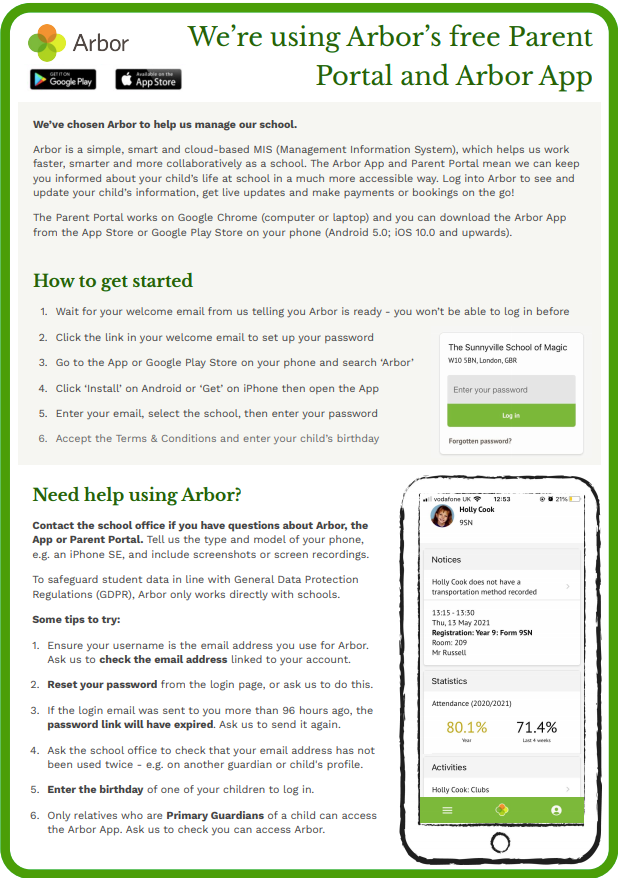
We have successfully completed our switchover from SIMS to Arbor and have now launched the Arbor App and Parent Portal. This allows parents and guardian to login and amend or correct their child/children’s contact details and personal information. Changed your child’s doctor or moved house? You no longer have to come into school or ring us, you can change your child’s information on any Internet-able device or via the app on your smartphone.
Going forward, the school is going to move away from our current Teachers2Parents app which we have used to send e-mails and texts to parents and guardians, and are instead going to use the Parent Portal. The Parent Portal and the smartphone app, Arbor App, allow us to send and receive messages to individual parents/guardians or to groups of parents/guardians or to all parents/guardians.
Also in the near future we will be moving away from using SchoolMoney to pay for school lunches and school trips. All payments will be made via the Parent Portal and Arbor App.
Further into the future, the school will also start using the Parent Portal and Arbor App to arrange and book Parents’ Evenings.
For all these reasons, we heartily encourage all parents and guardians with a legal guardianship role to log in to the Parent Portal and/or Arbor App using the instructions the school has already sent you. If you have not received an e-mail invitaion to log in to the Parent Portal and Arbor App and you believe you have legal guardianship over a child in school, please contact the school office to ensure we have your correct e-mail details and we will re-send the login instructions. Please note the login link expires after 96 hours. After this time, we will need to send you another invitation e-mail to log in to the Parent Portal and Arbor App.
For further information, please see the information poster and YouTube video below.
“The best thing about this school, when I ask my child this question, he said Mrs Emmerson. “
“School leaders are ambitious and highly knowledgeable about teaching and learning.”
“the school gives me advice as a parent so I can help my daughter.“
“We want to thank you for welcoming my family when we moved here (from Bulgaria).”
“The bike loan scheme.My family also like the school bank.“
“..closeness between all age groups and years.“
“The Head teacher and deputy are fab, they join in everything.”
“the amount of effort put in by the teachers to make topics interesting is brilliant.“
“The choice to do a traditional nativity was great !.“
“The photography club is brilliant, I think introducing things like this is brilliant for the children.“
“Miss Pulleyn is fantastic“
“I feel the school has advanced with regards to the appropriate curriculum for different age groups.“
Boothferry at Young Voices…..Just WOW! What an experience.”
“The joy of the teachers who greet the children and parents daily.“
“Being part of their learning – it doesn’t just stay in the classroom.”
“My children are developing very well in school.“
“My children are thriving as the school is committed to learning and progression.“
“Pupils’ personal development and welfare are outstanding. Pupils thrive and are keen to learn. They know how to look after their
wellbeing and how to keep safe. The school is an inclusive and happy place.”
“Leaders use funding well to ensure that pupils with special educational needs and/or disabilities (SEND) make strong progress from their different starting points.”
“Children get off to a strong start in early years. This is due to effective leadership and skilful teaching. The proportion of children reaching a good level of development is improving yearon-year.”
“The after school activities, film nights and discos.“
“The friendly atmosphere, the safe environment & the teachers’ encouragement.”
“The headteacher, senior leaders and governors are ambitious for pupils. Their determination has made Boothferry Primary a flourishing and successful school.”
“My son’s teacher is creative, enthusiastic and genuinely cares about him as an individual .“
“Senior leaders lead by example, modelling what is expected of all staff. Teachers feel valued and respected.”
“Teachers, including those who are new to teaching, have high expectations, and they plan creative lessons that spark pupils’ interest and inspire them to do well.”
“I love the fact that senior members of staff know the names of the children.“
“I love seeing school events on Twitter.“
“You can approach any member of staff and they help you.“
“My children have come on and made progress socially and academically since joining.“
“My kids love the fruit on the snack table.“
“The teaching of phonics is a strength and enables pupils to make rapid improvement in their early literacy skills. ”
“The stimulating learning environment. “
History day was amazing. Brilliant idea.
“We can only applaud the ingenuity & continued compassion of the young people at Boothferry.”
“Senior leaders lead by example, modelling what is expected of all staff. Teachers feel valued and respected.”
“Open weeks in Foundation allows parents to enjoy school as much as our children.“
“The headteacher, deputy headteacher and the assistant headteacher make an effective team. They sustain a culture of continuous i improvement through the school’s vision and specific learning goals, which include resilience, morality and adaptability.”
“Thank you for treating my child like your own.“
“When ever I have had a problem the staff on the whole have been sympathetic and helpful.“
“Pupils who speak English as an additional language make rapid progress. Disadvantaged pupils are also supported well to make good,
and sometimes better, progress in reading, writing and mathematics.”
“This school meets our expectations in every way.“
“Opening the school doors at 8.40am has made it much easier as it is less crowded.“
“School leaders have taken effective action to ensure that pupils make at least good progress from their low starting points in reading,
writing and mathematics in all year groups.”
“Leaders and staff have significantly improved the teaching of reading. Pupils are enthusiastic and frequent readers.”
“The curriculum is well designed to include a range of exciting themes, visits and visitors to enhance pupils’ learning. Pupils become
confident individuals who are well prepared for the next stage of their education.”